
Growing Your Subscribers
Build a subscriber list of customers who actually want to hear from your restaurant.
Dashboard only
Social media decides who sees your posts. Your subscriber list doesn’t. When a customer hands over their email or phone number, you have a direct line to them: no algorithm, no pay-to-reach. That makes your list one of the most valuable assets your restaurant owns.
Viewing Your Subscribers
Go to Marketing → Subscriber List to see everyone who signed up through your website.
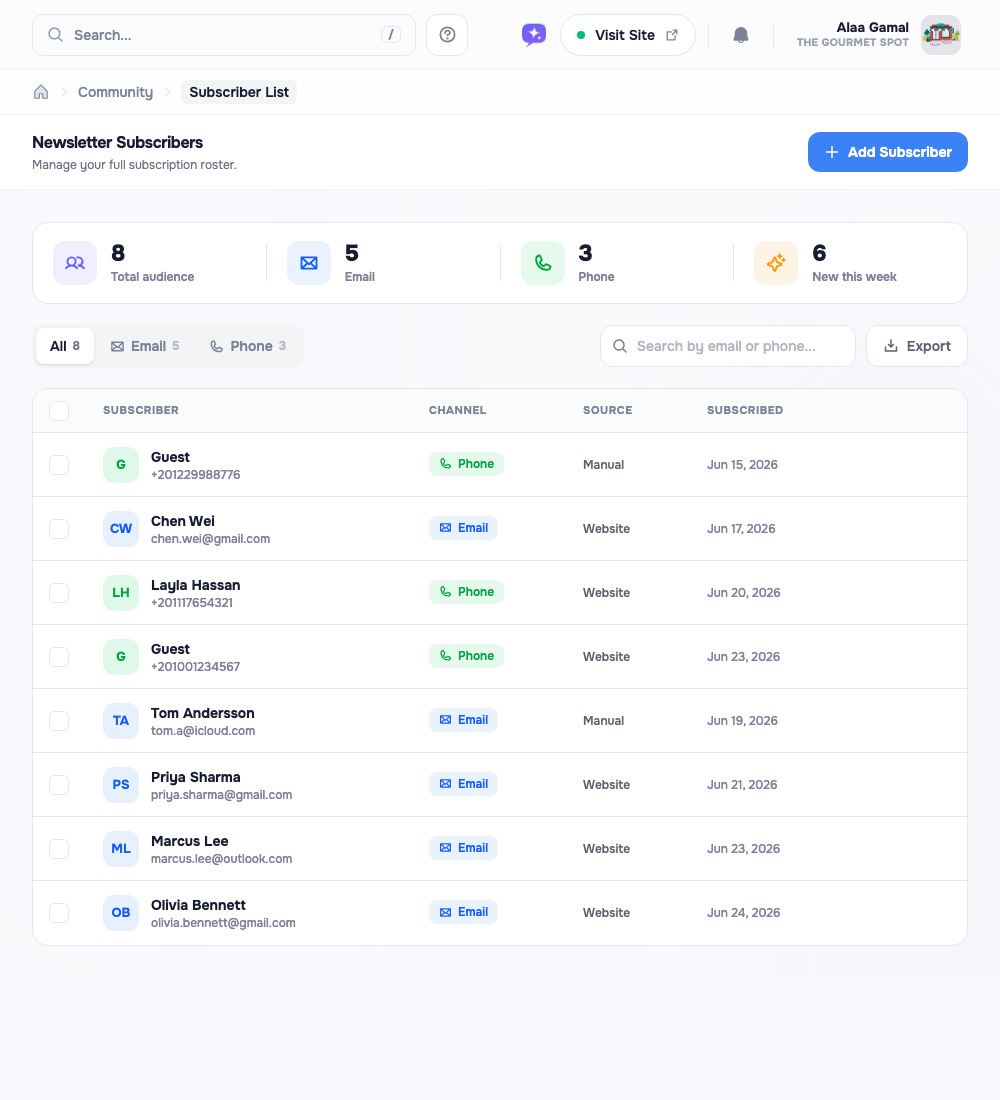
The strip along the top gives you the headline numbers: total subscribers, how many are email versus phone, and how many joined this week. Below it sits your full roster, one row per person, showing their channel (email or phone), where they came from (your website or added manually), and when they signed up.
A few tools keep a long list manageable:
- Segmented filter: jump between All, Email, and Phone subscribers; each tab carries its own count.
- Search: look someone up by name, email, or phone number.
- Load more: the list pages in as you scroll, so it stays fast even with thousands of entries.
Adding Someone Yourself
Collected an address at the host stand or on a comment card? Click Add Subscriber (top-right) to enter it by hand.
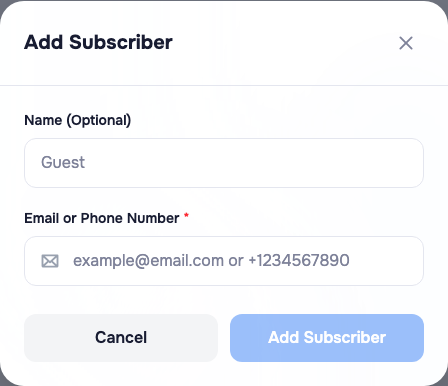
The contact field is smart: type an email and it’s filed under Email; type a number and it’s filed under Phone. The name is optional. Manually added people show a Manual source badge so you can tell them apart from website sign-ups.
Exporting Your List
The Export button downloads your list (names, contacts, channels, sign-up dates) as a CSV file. That’s your list to keep: open it in a spreadsheet, or load it into the email or SMS tool you already use to send out a promotion.
Note: Subscriber data belongs to you. Unlike social followers, you own this list and can take it with you anytime. Sending campaigns straight from the dashboard is coming soon, there’s an Email Marketing page waiting under the Marketing group, though its campaign tools aren’t switched on just yet. Until they are, export your list and send through your own channel.
Keeping It Clean
When someone asks to be removed, or you spot a duplicate or a bad address, use the Delete action on their row. Select several at once and the bulk action bar lets you export or remove them together. An accurate list means your outreach never gets wasted on dead addresses.
Building the List
The subscribe form on your website does most of the work, but a few offline nudges speed things up:
Tip: Mention your list where people are already paying attention, on the check, a table card, or near the register: “Join our list for exclusive offers.” Even 100 engaged subscribers can drive real repeat business.
Other things that work:
- QR codes on receipts or table tents pointing to your subscribe form.
- A quick word from staff at the end of the meal: “If you enjoyed tonight, we send our weekly specials by email.”
- A small incentive: “Subscribe and get 10% off your next visit”, to push sign-ups up sharply.
Good Habits
- Respect the relationship. Don’t message daily. Once a week or twice a month is the sweet spot for most restaurants.
- Deliver value every time. A deal, real news, an invitation: if you wouldn’t care about it as a customer, don’t send it.
- Grow steadily. A list isn’t built overnight. Aim for slow, organic growth over months.
Your subscriber list is a long game, but it pays off. Every name on it chose your restaurant once. Treat them well and they’ll keep choosing you.