
Reviewing & Publishing Your Changes
Work in a private draft, check exactly what changed, then publish everything at once, with undo, discard, and a live-site link.
Dashboard only
Everything you do in the Design Studio happens in a draft only you can see. Recolour the whole site, restack a page, swap every photo: customers keep seeing the version they always have until you publish.
Draft or live
The studio footer always shows where you stand: Unpublished draft while changes are pending, Published once they’re out. View live site opens the real public site in a new tab for comparison.

Check what’s actually pending
With edits waiting, a pill shows the count. Click it and Review changes lists them, separated into design tweaks and section changes: added, edited, or removed, and on which page.
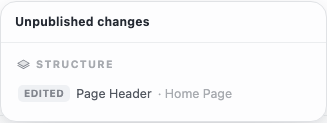
Worth reading after a long session. Drafts persist between visits, so a change you made days ago and forgot about publishes along with today’s work. This panel is where you catch it.
Undo, redo, discard
Two footer arrows step back and forward through recent changes, and the keyboard shortcuts work too (⌘/Ctrl + Z, add Shift to redo).
Discard throws away the entire draft and snaps back to what’s currently published. It’s all-or-nothing: there’s no discarding one change while keeping others, so use undo for that.
Publishing
Click Publish and every pending change goes out together. There’s no publishing selectively: design, structure, and content all ship in one move. The pill clears and the status flips to Published.
Your site won’t change in the same instant. It takes about a minute for the new version to build and reach visitors: how your website updates explains why that delay is what makes your site fast.
Tip: For big structural changes, publish during a quiet hour. For a colour tweak or a typo fix, publish whenever.