
Managing Reviews
Moderate customer reviews to build trust and showcase your restaurant's reputation.
Dashboard and mobile app
Most diners check reviews before they pick where to eat. The ones customers leave on your Lekro site are some of the strongest proof you have that real people enjoyed your food, and how you manage them feeds straight back into how many new faces walk through the door.
Viewing Your Reviews
Go to Community → Customer Reviews. The page opens with your numbers up top (average rating, total reviews, and the spread across one to five stars) followed by every review itself:
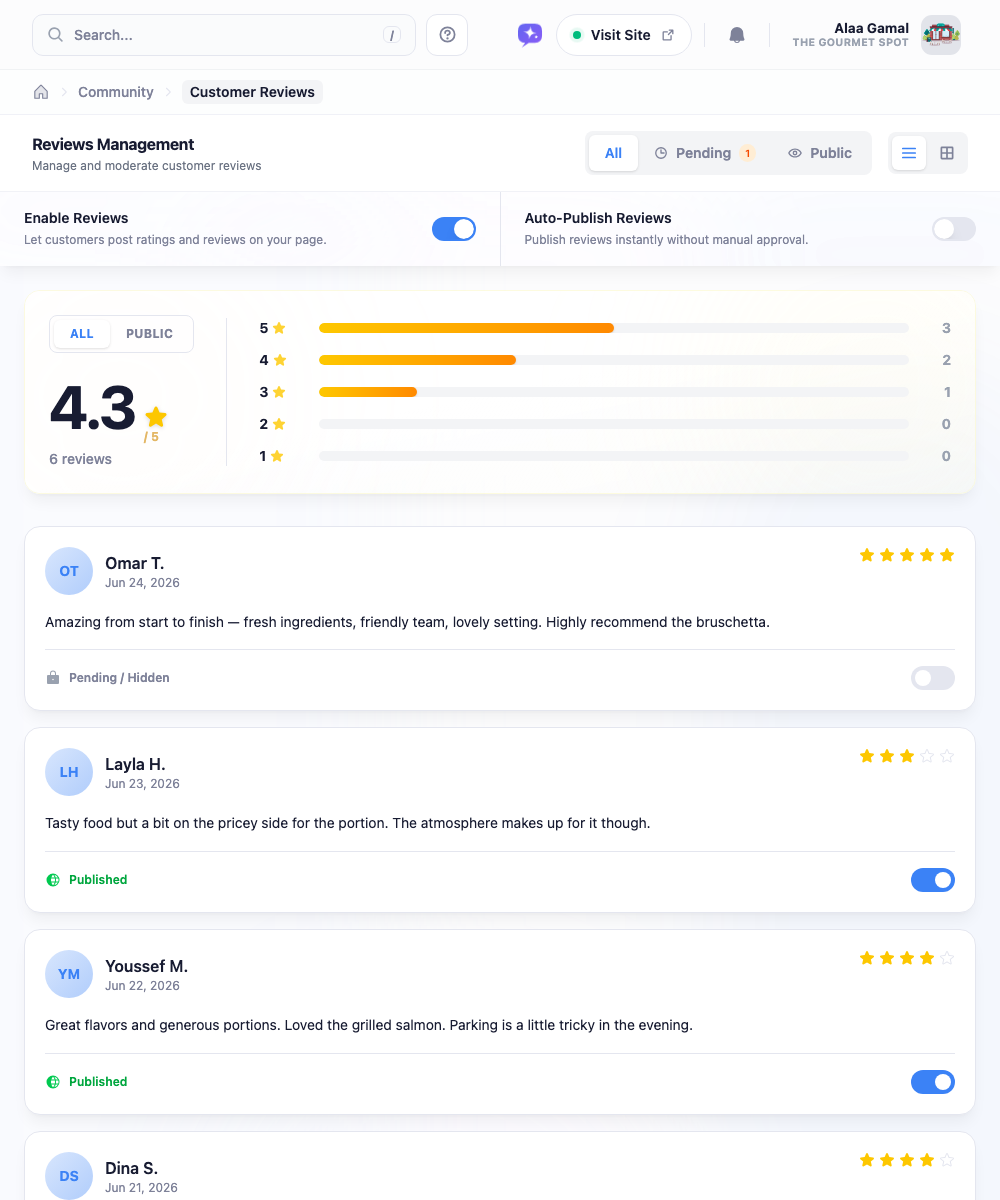
The filter tabs let you jump between All reviews, Pending ones waiting for you (with a count, so you never miss them), and the Public ones currently live on your site. You can read them as a list or switch to a grid of cards, whichever suits you.
Controlling What’s Public
Every review has a visibility switch. Published means it’s live on your website; the other state, Pending / Hidden, keeps it in your dashboard for your eyes only.

How New Reviews Arrive
Two settings at the top of the page decide how reviews flow in:
- Enable Reviews: turns review collection on or off entirely. Mid-renovation or relaunching your menu? You can pause new reviews for a bit.
- Auto-Publish Reviews: the one that matters most. Off, every new review waits in your Pending queue and nothing goes live until you approve it. On, reviews appear on your site the moment they’re submitted.
Tip: Start with Auto-Publish off so you can read feedback before it’s public. Once you’re confident in the experience you’re delivering, switch it on to save yourself the step.
A Word on Negative Reviews
The instinct is to hide anything below five stars. Resist it. A page of nothing but flawless reviews actually reads as fake to anyone paying attention: a few honest three- and four-star notes mixed in make the whole thing believable.
Warning: Hiding every critical review can backfire. A realistic mix of ratings builds more trust than a suspiciously perfect 5.0.
Treat a fair criticism as free advice: if the complaint holds up, fix the thing. The Hidden switch is for what genuinely doesn’t belong, spam, abuse, or something clearly fake. Hide that and move on.
Habits Worth Keeping
- Check in weekly. If Auto-Publish is off, don’t let the Pending queue pile up: customers notice when their feedback seems to vanish.
- Chase volume, not perfection. A 4.5 from 200 reviews is far more convincing than a 5.0 from three. Nudge happy customers to leave a note.
- Watch the trend. If your average starts sliding, that’s an early warning to look at what’s changed in the kitchen or on the floor: long before it shows up in your covers.
Your reviews aren’t just a feature; they’re your reputation in public. Give them the same attention you give the dining room.