
Deleting a Restaurant
How to permanently remove a restaurant, the 48-hour grace period, and how it differs from closing your account.
Dashboard only

The Danger Zone is the last tab for a reason. Deleting a restaurant removes it for good: its menu, gallery, reviews, settings, and any subscription tied to it. The only safety net is a 48-hour grace period: nothing is actually erased until those two days pass, and you can call it off at any point before then.
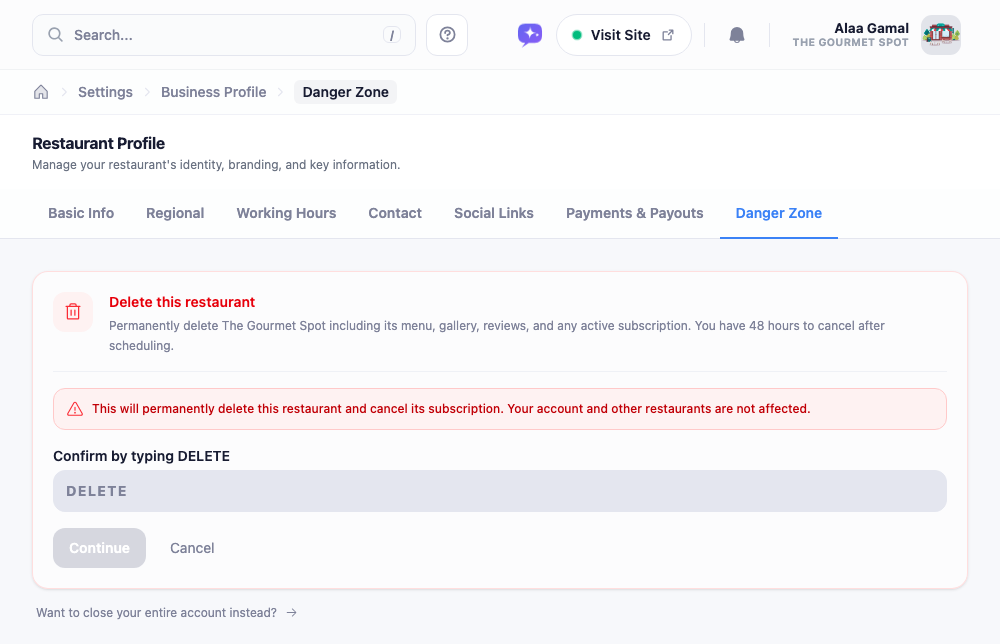
Scheduling the deletion
Deleting isn’t a single click. There are a couple of deliberate speed bumps so it can’t happen by accident:
- Click Schedule deletion.
- Type DELETE into the box to confirm you mean it.
- Enter your password one more time.
Once scheduled, a banner shows the date it’ll happen, with a Cancel deletion button right there. Change your mind before the 48 hours are up and the restaurant carries on as if nothing happened.
If it’s your only restaurant
There’s one case that works differently. If the restaurant you’re trying to delete is the only one on your account, removing it would leave you with nothing to sign in to, so that’s really closing your whole account. Instead of the delete flow above, this tab points you to Account → Privacy & data, where account deletion lives (also with a 48-hour grace period). See Managing Your Account for that side of things.
Deleting a restaurant never touches your other restaurants or your login. Closing your account removes everything. The dashboard keeps the two clearly apart, and so should you.