
Backing Up and Restoring Your Menu
Snapshot your whole menu before a big change, roll back in one click, and know why only your last ten snapshots are kept.
Dashboard only
A snapshot freezes your entire menu at the moment you take it. Menu deletions have no undo, so this is the closest thing Lekro has to one, and it takes a second.
It’s at the bottom of Menu → Import / Export.
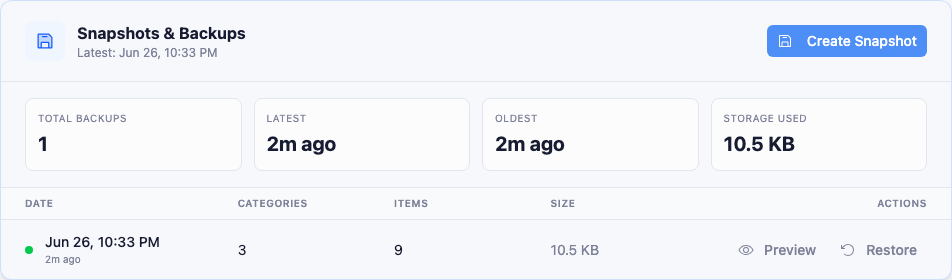
Taking one
Click Create Snapshot. Lekro saves every category, item, price, and detail as it stands, and the snapshot appears in the history with its date, how many categories and items it holds, and its size.
Worth doing before: a seasonal overhaul, any import, a bulk delete, or handing the menu to someone else to edit.
Only your last ten are kept
Warning: Lekro keeps a maximum of 10 snapshots. Taking an eleventh silently deletes the oldest. There’s no warning and no way to recover it.
This matters more than it sounds, because destructive imports create snapshots automatically. Choosing “Replace entire menu” in the photo import or “Replace All” in a file import each generate one without you asking. A few of those, and a snapshot you were relying on can quietly fall off the end.
If a particular version matters long-term (last year’s winter menu, say), export it as a file as well. Exports live on your device and nothing expires them.
Restoring
Each row has Restore, and a Preview so you can check a snapshot’s contents before committing. Restoring replaces your current menu with that version, so you’re asked to confirm.
Be clear about what that means: everything you’ve added since that snapshot was taken is gone. That’s the point when you’re undoing a mistake, but worth a moment’s thought if you’ve done good work in between.
Tip: Take a fresh snapshot of the current menu before restoring an old one. Then you can move between the two versions freely instead of trading one for the other.
Backups vs. exports
Two different jobs, easily confused:
- Backups live in your account, restore in one click, and cap at ten. Built for rollback.
- Exports download a file to your device, never expire, and can be edited in a spreadsheet. Built for taking the menu out of Lekro.
Use backups for “I’m about to do something risky.” Use exports for “I want to keep this, or work on it elsewhere.”