
Waiter Calls
Let guests call a server from their phone, and clear every request from one live board.
Dashboard and mobile app
A guest taps a button on their phone and their table appears on your board. No raised hands, no hovering.
Getting it working
Two things have to be true: the Waiter Calling switch is on in Menu Configuration, and guests can reach your menu from the table, in practice, a QR code on the table with a table number.
Requests land on Operations → Waiter Calls.
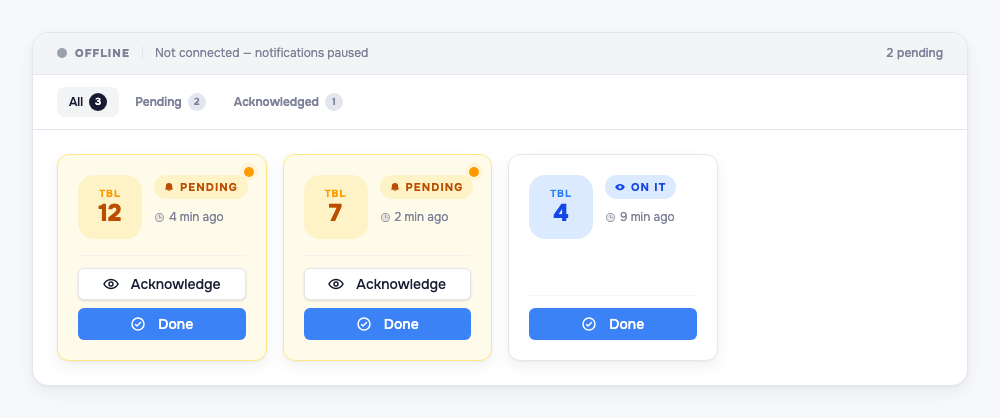
Each card leads with the table number in large type so it reads across a room, plus a status badge and a timer showing how long the guest has waited. Filter tabs narrow to Pending, Acknowledged, or All.
Watch the connection banner
The banner at the top reads Live when the board is connected and listening.
Warning: If it reads Offline, notifications paused, new calls will not appear and no sound will play. Nothing is lost, but nobody is being alerted either. On a shared tablet this can go unnoticed for an entire service, so it’s worth a glance at the start of each shift.
Clearing a call
- Acknowledge: a server is on the way. The badge flips to On it, so nobody doubles up on the same table.
- Done: the guest has been helped. The call leaves the board.
Two limits worth knowing
- A table can only call once every 2 minutes. Repeated taps inside that window are ignored, so an impatient guest can’t flood the board. If a table seems to have gone quiet after calling, that’s why: they’re throttled, not forgotten.
- Calls expire automatically after 3 hours. An unanswered request never carries into the next shift. It also means the board is not a record: if you want to review response times, do it during service.
Tip: Keep this page open on a tablet at the pass or host stand. The table number is sized to be read at a glance, so whoever is closest can take it.