
Menu Configuration: Ordering and Service
Choose which order channels you accept (pickup, dine-in, delivery), set a delivery fee and radius, and switch on table-side waiter calls.
Dashboard only
Menu → Menu Configuration controls how your menu behaves for customers, rather than what’s on it. Two decisions live here: which ways people can order, and whether they can call a waiter from the table.
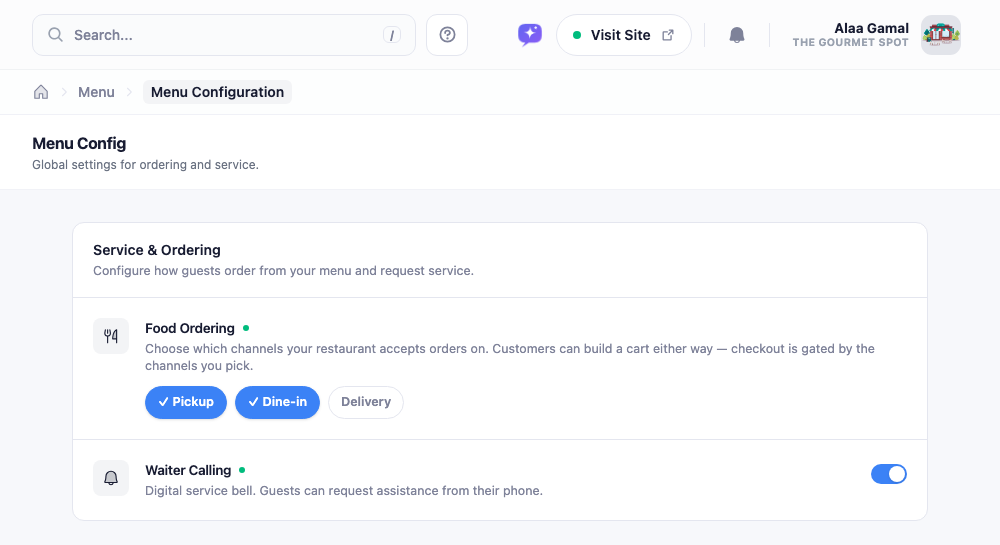
Order channels
Pickup, Dine-in, and Delivery are independent chips. Click one to switch it on, click again to switch it off. Turn on only what you genuinely offer.
New restaurants start with Pickup and Dine-in on, Delivery off. That’s what the ordering toggle in the setup wizard actually sets, which is why delivery never appears until you come here.
Note: Switch all three off and your menu becomes view-only. Customers can still browse everything, but the ordering button disappears entirely. That’s a legitimate setup for a restaurant that just wants a QR menu with no online orders, it’s only a problem when it happens by accident.
Delivery settings
Switching Delivery on reveals two fields that the other channels don’t need:
- Delivery Fee: a flat charge added to delivery orders. Leave it empty for free delivery.
- Delivery Radius (km): how far out you deliver. Orders to an address beyond this are refused at checkout, so you’re not turning people down after they’ve ordered.
Switch delivery back off and both fields tuck away, keeping their values for next time.
Waiter calling
Waiter Calling puts a service button on the menu so a seated guest can request help from their phone instead of trying to catch someone’s eye.
It pairs with QR codes on tables: without those, guests are unlikely to have the menu open while seated, and the button has little purpose. Once it’s on, waiter calls explains how requests reach your staff.
Saving
Nothing here applies until you save. Adjust anything and a save bar appears at the bottom of the page with a count of pending changes; click save and they go live immediately.
Once customers start ordering, managing orders picks up from here.